

Summary
- What defines an outlier is something that causes a great deal of confusion amongst Data Scientists. Most Data Scientists get this wrong.
- An outlier is not just simply a datapoint that has a very large or very small value.
- My personal definition of an outlier is, “a datapoint that comes from a different statistical process than the one I’m currently modelling”.
- Since real world data is typically made from multiple statistical processes, it is better to think not in terms of a dataset being comprised of “ok data + outliers”, but instead to think of data as being comprised from data from process 1, plus data from process 2, and so on.
- Throwing away outliers is not a good idea. They made up part of your real dataset so you are throwing away insight into how your data gets generated. It is ok however to exclude “outliers” from estimation of the parameters of a specific statistical process if you have confidently identified those “outliers” as coming from a different mechanism.
Introduction
The image above is a well known meme, right. It’s quite funny, right? Yes, except I have seen this precise situation happen. 25 years ago I went to a talk where a scientist was presenting some experimental gene expression work they’d been doing. As they were using a new assay technology called ‘microarrays’, which they were concerned could provide noisy measurements, they’d decided under advice from another scientist to throw away any datapoints that were more than +/- 2 standard deviations from the mean of their data. My colleague and I, who were working on the theory of statistical analysis of microarray data, asked how much data they’d discarded. “It’s quite weird. We always seem to end up removing about 5% of the total data, no matter what experiment we do” was the reply. I’ve remembered that reply word for word since then.
What do you think an outlier is?
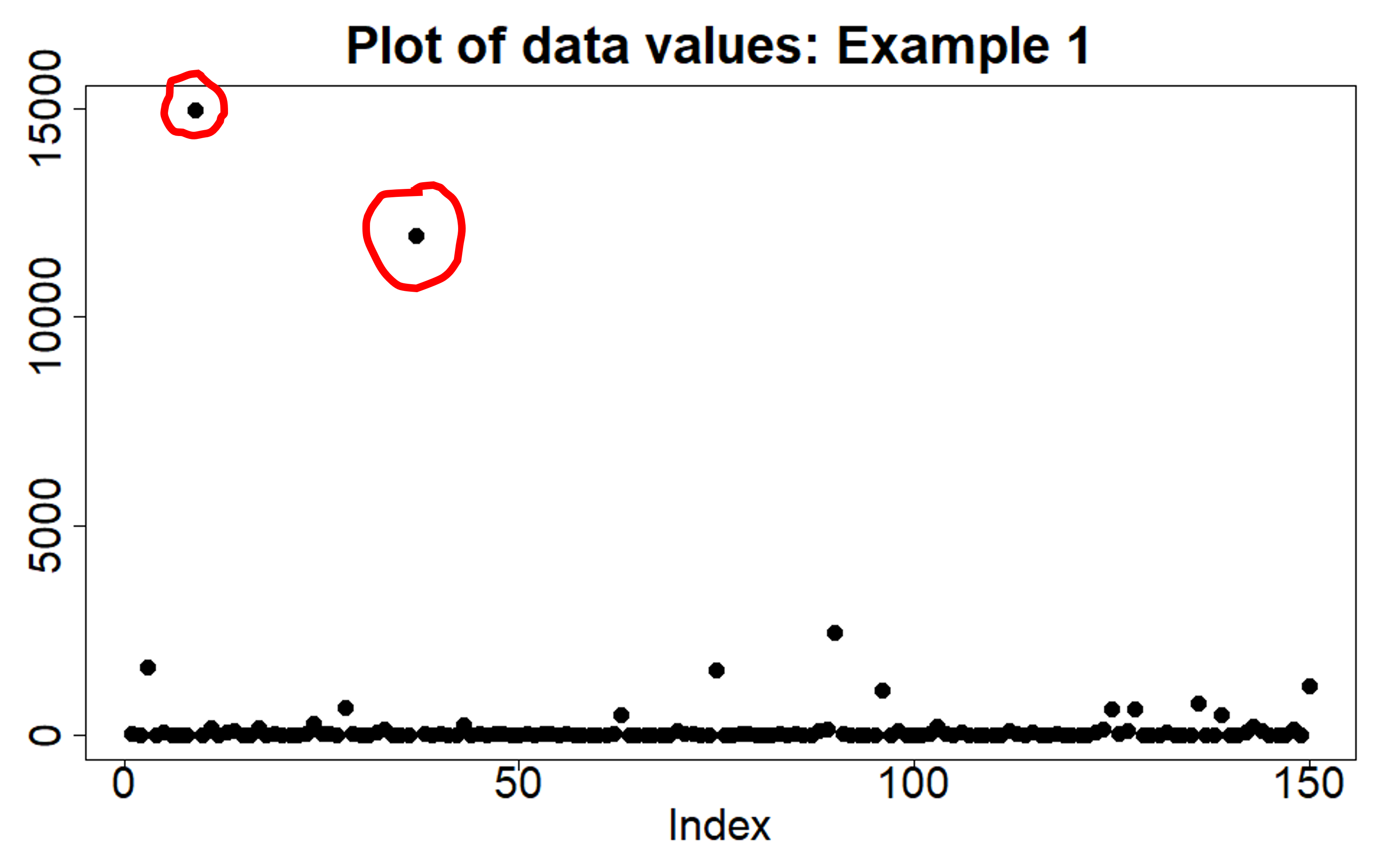
Take a look at the plot below. It is a dataset of 150 datapoints, with the values plotted on the y-axis and the index of each datapoint on the x-axis. Which datapoints do you think might be outliers? Possibly the ones I’ve circled in red, as they are clearly much larger than the bulk of the data points. Perhaps we should discard them?
Okay, what about this second plot below? Again, a dataset of 150 datapoints. Probably no outliers right? All the data points are reasonably clustered together on the y-axis. Yes, some are more towards the edges but you would think you could easily model the distribution of this data using a single Gaussian distribution.
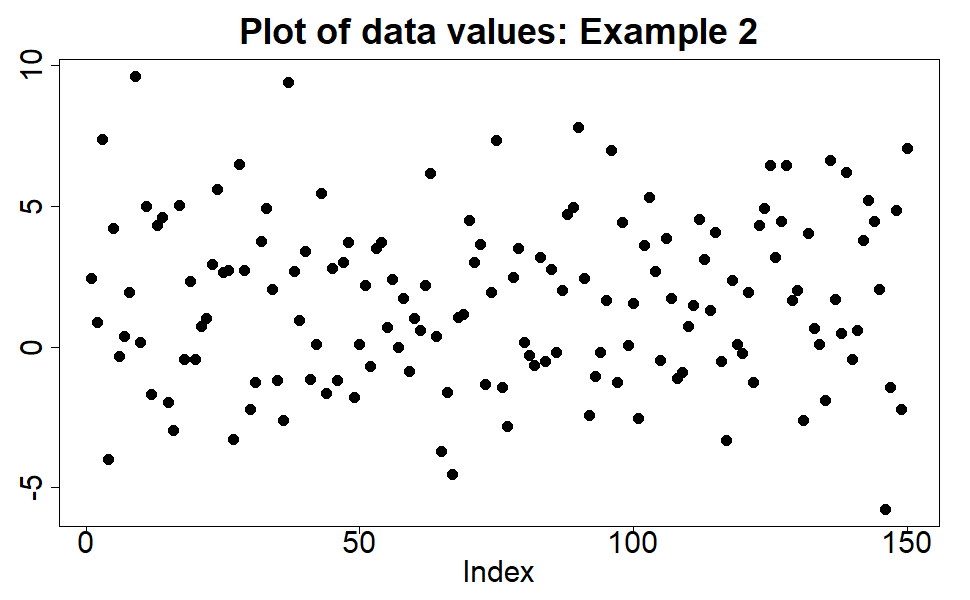
The two plots are of the same data.
How is this so? The data is drawn (simulated) from a log-normal distribution. The second plot shows the data values on a log scale, and as we’ve already commented we would be happy modelling the distribution of the data using a Gaussian distribution, using all the data points to estimate the mean and variance of that Gaussian distribution. The first plot shows the data on the original scale – sometimes we refer to this as the ‘normal scale’, but not to be confused with ‘normal’ as in ‘normal distribution’, we just mean we haven’t taken the logarithm. And yet, now we know that the appropriate distribution to use to model this data is a log-normal distribution, we are happy to use all the datapoints in the first plot to estimate the parameters of that log-normal distribution. There is no need to discard or throw away any datapoints.
What have we learnt from this little experiment? Two things:
- Whether a datapoint is an outlier or not has nothing to do with how big the data value is.
- If a datapoint is consistent with the statistical distribution or process we are trying to model, then we can use it. It is not an outlier, no matter how big or small it is.
The second point is my favourite way of defining an outlier. An outlier is a datapoint that comes from a statistical process other than that process which we are currently trying to model. Okay, that definition sounds a bit dry and technical, but I like it because it emphasizes that an outlier is not ‘wrong’, ‘incorrect’ or ‘deficient’ in any sense. It has not ‘corrupted’ or ‘contaminated’ the dataset in any true sense, even though those are common terms used in statistics when discussing robust parameter estimation methods. Instead, saying that a datapoint is an outlier just means we are saying it comes from a different mechanism than the one we are currently modelling. All the datapoints in the two plots above came from the same statistical process. I know because that is how I generated them.
The definition of an outlier I have just given also tells us why we are justified in omitting (not throwing away) outliers when estimating the parameters associated with the statistical mechanism we want to model. If a datapoint hasn’t come from the statistical mechanism we want to model, including it in any estimation or training algorithm will lead to incorrect parameter estimates. So once we are confident we have correctly identified any outliers, omitting them from the parameter estimation process is justified.
An illustration

Let’s we want to estimate the typical energy usage per square metre of rooms in a residential house. I can get data on a load of houses; the total energy use, the number of rooms, and the total floor aera of those rooms. It’s an easy calculation to then work out the average energy consumption per square metre. But if I notice that several of the ‘houses’ in my dataset have over 150 rooms each, I‘m probably going to think that they are not typical residential houses. Most likely they are hotels, or mansions of some tech billionaires. Either way, the pattern of energy usage for the rooms in those hotels/mansions is likely to be very different from that of a room in a typical residential house. The energy usage for those hotel rooms comes from a different statistical process to that for the residential house rooms. The datapoints from those hotels are outliers to what I’m trying to model. I should therefore exclude them from my estimation algorithm. That’s easy to do now that I’m am confident I have identified the outliers appropriately. Job done!
Life (and data) is always made up of multiple processes
The other reason I like the outlier definition I have given is that it emphasizes that real data is almost always made up of data coming from multiple mechanisms or processes. The outlier definition I’ve used highlights that an outlier isn’t wrong, it’s just different. Sometimes we only want to model in depth just one of the statistical mechanisms contributing to our dataset, so we omit the outliers and run our training algorithm. Other times we need to model all of the data in our dataset and so we break down our dataset into the different generative processes/mechanisms that we think are at play, select the appropriate subset of data for each process, and run an appropriate training algorithm on that subset. Instead of thinking of the data as being made up of ‘good’ data plus ‘outliers’, I now think of it as, ‘data from mechanism 1’ plus ‘data from mechanism 2’ plus ‘data from mechanism 3’, and so on.
Let’s revisit our energy consumption example to illustrate this. Say, now I want to model energy use per square metre for different types of buildings – residential houses and hotels. Now it is just a question of filtering the data to the datapoints matching the building type. As we said before, the energy use patterns will probably be different for houses and for hotels, i.e. we have different statistical processes generating the different subtypes of data. Consequently, we choose to use different distribution types to model the different building types. So what we have is not outliers, just a different training process for each of the different building types.
How to detect outliers?
So far I have only discussed how to think about what an outlier is. I’ve said that you are justified in excluding genuine outliers from parameter estimation once you have correctly identified them. What I have not discussed is how you actually do the outlier detection. That is deliberate, as it is a much bigger topic. It is also one I will touch upon, in part, in later posts in the Data Science Notes series.
What you will hopefully have grasped is that if we are to use something like standard deviation (SD) to determine whether a datapoint is an outlier, we need to replace the naive “|x – mean | > 2SD” filter shown in the meme image at the start and replace it with a question that asks whether the datapoint is consistent with a statistical process that has the given mean and SD. So we need to replace the meme with a question more like, “what is the probability of the highest value in a dataset of size N being greater than x?” We can see that outlier detection now takes into account the sample size and brings us into the realm of extreme value theory (EVT) – also a topic for a later Data Science Note.
Conclusions
- An outlier is a datapoint that has come from a statistical process different to the one we are currently modelling.
- Excluding outliers from parameter estimation for the statistical process we are currently modelling is valid because they don’t, by definition, conform to that statistical process and so would bias the parameter estimation/training algorithm.
- Most datasets are made up of data from multiple different statistical processes, and so we should get used to thinking not in terms of “ok data + outliers”, but data from process 1, data from process 2, and so on.
- If we want to model a complete dataset we may need to appropriately subset the data into its different statistical process and run parameter estimation algorithms for each subset/process.
- By breaking down a dataset into its component processes, we are handling in an appropriate way what we previously thought of as the “outliers”. We haven’t had to throw away any datapoints, merely just temporarily exclude them when necessary.
© 2026 David Hoyle. All Rights Reserved
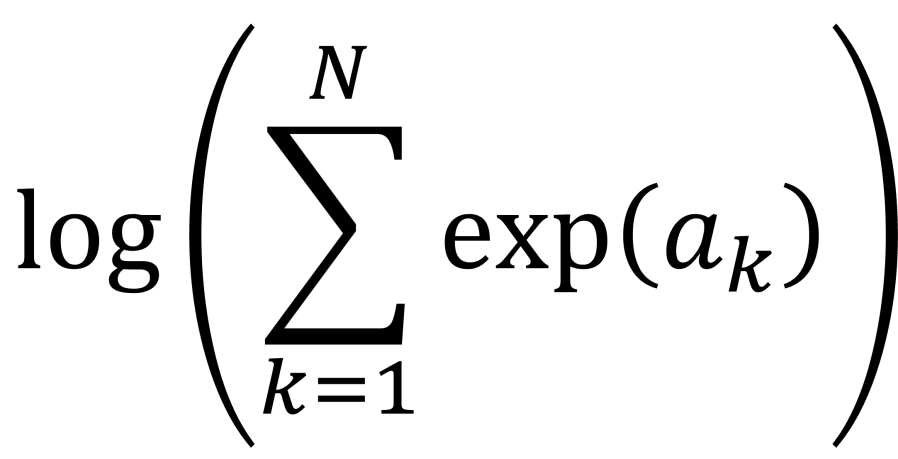
 . This calculation is called log-sum-exp.
 function.
 , where you have values for the
  . Really? Will you? Yes, it will probably be calculating a log-likelihood, or a contribution to a log-likelihood, so the actual calculation you want to do is of the form,
 and
and  and
and  to
to  we are using floating point arithmetic to try and add a very large number to a much smaller number. Most likely we will get an overflow error. If would be much better if we’d started with
  , which would be very negative and from this we could easily infer that adding
  by
by  and computes an accurate approximation to
  without encountering underflow or overflow errors.
![a = [a_{1}, a_{2}, \ldots, a_{N}]](https://s0.wp.com/latex.php?latex=a+%3D+%5Ba_%7B1%7D%2C+a_%7B2%7D%2C+%5Cldots%2C+a_%7BN%7D%5D&bg=ffffff&fg=111111&s=0&c=20201002) . Let’s say, without loss of generality, the maximum value is
. Let’s say, without loss of generality, the maximum value is 
 are all negative for
  , so we can easily approximate the logarithm on the right-hand side of the equation by a suitable expansion of
  . This is the “log-sum-exp” trick.

 , it is also relatively easy to show that,

 are allowed to be negative. This means, that when we are using the SciPy log-sum-exp function to perform the log-sum-exp trick, we can actually use it to calculate numerically stable estimates of sums of the form,
 .
. . This is because the first two contributions,
  .
.


 and
and  are our starting features or values from the two datsets we are comparing. Typically, the pre-factors of
  are omitted and we simply define our new features as,

 against
  . I’ve shown the new plot below.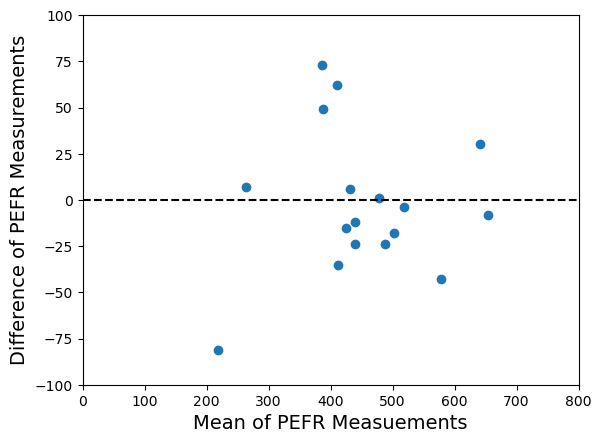

 Hoyle Analytics